Shipping & Labels
Create Shipping Labels Automatically – with DHL, Hermes, Sendcloud, and 160+ Additional Carriers
Create shipping labels, manage shipments and automate your shipping processes in one central platform. Whether orders from Amazon, Etsy and Shopify or sales orders from your business, shipping, tracking and fulfillment come together in one place.
additional carriers
Label creation from sales orders & orders
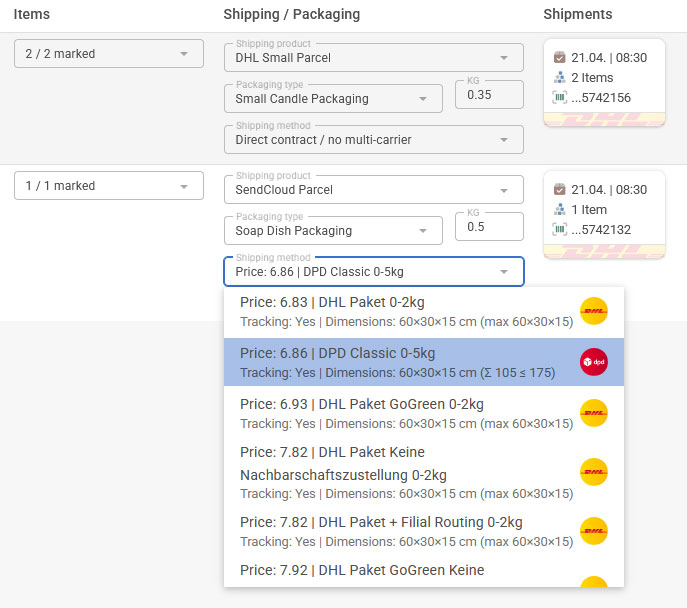
Find suitable shipping options faster
Everything you need for Shipping
From sales orders and picking to the finished shipping label – eCommerce One simplifies your shipping and fulfillment processes.
160+ Carriers
eCommerce One gives you access to a wide range of national and international shipping options for growing businesses.
Directly from Sales Orders & Orders
Shipping labels can be created directly from sales orders, orders, and existing business processes.
Shipping Services & Returns
Use carrier-specific services such as returns, cash on delivery, age verification, bulky goods handling, and other additional services.
Custom Packaging
Store your own packaging types with dimensions, weight, and characteristics to find suitable shipping options more quickly.
Automatic Customs Declarations
Generate required customs information such as CN22 and CN23 directly from your order and product data for international shipments.
Fast Selection via Barcode Scanning
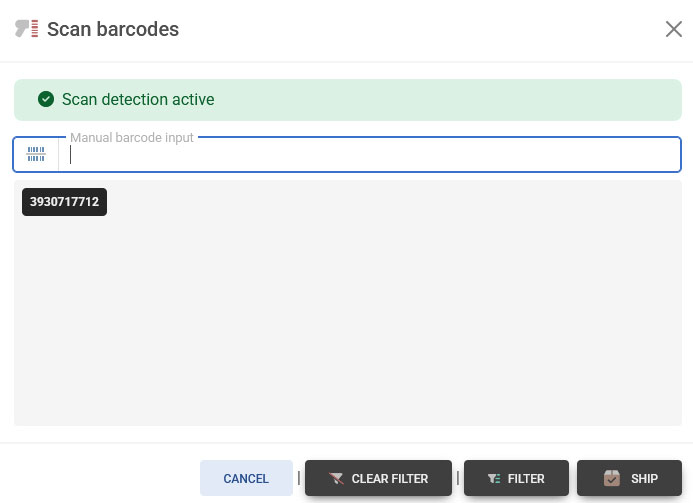
Scan the barcode on your picking slip and instantly select the correct order for shipping – without manual searches or unnecessary clicks.
From Sales Order to Shipping Label in Just a Few Steps
eCommerce One connects sales orders, orders, and shipping processes into one seamless workflow.
1. Import Sales Order
Sales orders or orders from platforms such as Amazon or Shopify are imported automatically or created directly within eCommerce One.
2. Create Label
Carrier, parcel data, and shipping services are processed automatically.
3. Start Shipping
Tracking information and shipping labels are immediately available within the workflow.
Manual Shipping
- Manage shipping data across multiple systems
- Transfer shipping information manually
- Open carrier portals individually
- Higher risk of errors as shipping volume grows
Shipping with eCommerce One
- Create shipping labels directly from sales orders or orders
- Automatically send tracking information to Etsy, Amazon, and Shopify
- Manage sales orders, orders, and shipping processes centrally
- Meet shipping deadlines, use partial shipments, and update shipping statuses correctly
Configure Shipping Services, Returns, and Custom Packaging
eCommerce One supports not only standard shipping label creation but also advanced shipping services such as returns, cash on delivery, age verification, and other carrier-specific services.
You can also define your own packaging types with dimensions, weight, and characteristics. This saves time during shipping and is especially valuable for multi-carrier integrations such as Sendcloud, where eCommerce One can determine suitable shipping options more accurately based on parcel properties and selected services.
- Store custom packaging types with dimensions and weight
- Prepare return labels and return workflows
- Use additional services such as cash on delivery and age verification
- Determine better shipping options based on parcel data and selected services
Returns
Prepare return processes in a structured way
Cash on Delivery
Use additional carrier services where available
Age Verification
Support specialized shipping services
Packaging
Store custom parcel types and dimensions
Create Shipping Labels Directly from Your Sales Orders
As soon as sales orders or orders are available, you can create shipping labels directly from them. Customer data, delivery addresses, and shipping information are transferred automatically. With Barcode Scan, you can select transactions within seconds and ship them without unnecessary intermediate steps.
- Fewer manual entries
- Fewer address and shipping data errors
- Faster fulfillment as order volume grows
Choose the Right Carrier for Every Order
Use the most suitable shipping products, services, and carriers based on destination, weight, warehouse location, or preferred shipping workflow.


















Start Creating Shipping Labels in Minutes
Connect carriers, automate shipping workflows, and create shipping labels centrally with eCommerce One.
Start Free Explore More Features